“I’ll sort it out at tax time.”
Until tax time means digging through months of statements, receipts and half-remembered shifts.
Keep a running record instead.CA BUILT FOR CANADIAN DELIVERY DRIVERS
Four apps. A glovebox full of receipts. And tax season in the back of your mind.
Bring your shifts, kilometres and expenses into one smart Google Sheets dashboard. Know what you earned. See what it cost. Stop leaving the record-keeping for later.
Google Sheets template · Manual entry. Automatic calculations.
Secure Stripe checkout. Your setup guide unlocks after payment.
SOUND FAMILIAR?
You remember the long shifts. But do you remember the kilometres, the fuel, and which app was actually worth your time?
Until tax time means digging through months of statements, receipts and half-remembered shifts.
Keep a running record instead.A payout is not the whole picture. Hours online and fuel costs change what a shift was really worth.
See the rate behind the revenue.Expenses are easy to forget when they live in your inbox, your car and three different notes.
Give every expense a home.ONE WORKBOOK. THE WHOLE PICTURE.
Not a generic budget sheet. A practical system for Canadian drivers balancing multiple platforms, real costs and tax-season prep.
See your gross revenue, recorded expenses and fuel, pre-tax net profit, kilometres and hours online together. Compare platform performance without juggling four separate histories.
Auto-calculated fields · Illustrative shift, before tax and other costs
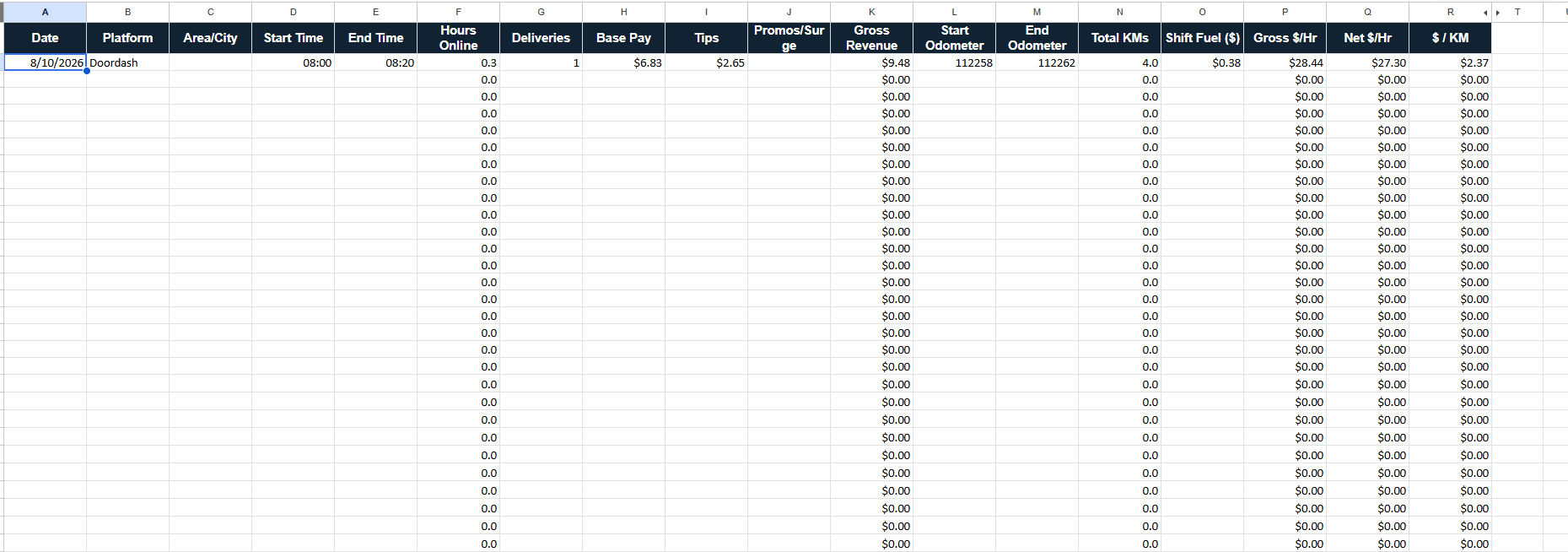
Enter your date, platform, area or city, start and end times, deliveries, base pay, tips, promos or surge, odometer readings and shift fuel.
The sheet calculates hours online, gross revenue, total kilometres, gross $/hr, fuel-adjusted net $/hr and gross $/km. Less calculator work. More useful information.
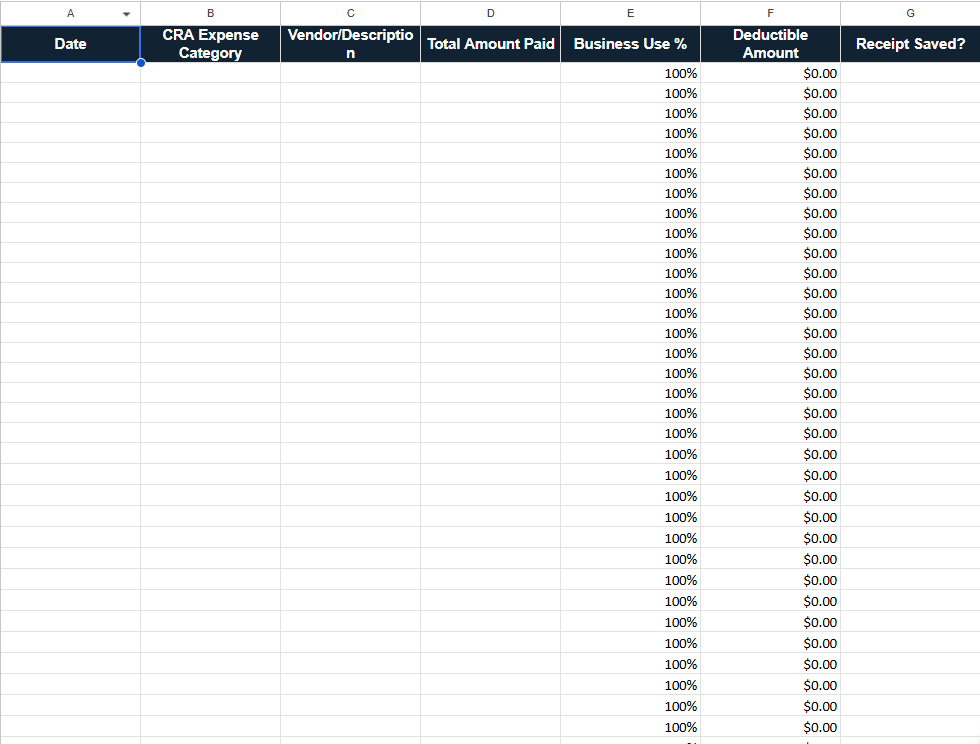
See the real shift logEnter the date, CRA expense category, vendor or description, total paid and business-use percentage. The deductible-amount column calculates the business portion of your entry.
Mark whether you saved the receipt so missing documentation is easier to spot. Keep the actual receipts separately and check that each claim is eligible.
Add or edit platforms as your work changes. Reference the included CRA expense categories for the T2125 form, right inside the workbook.
NO GUESSING WHAT YOU'RE GETTING
The interactive preview above explains the features. These are actual views of the product. Select a screenshot to inspect the full image.
BUILD A BETTER END-OF-SHIFT HABIT
Use Uber Eats, DoorDash, SkipTheDishes and Instacart, or edit the list to match your work.
Log shift details and odometer readings. Record expenses and whether you saved each receipt.
Let the formulas turn your entries into hours, kilometres and earnings rates. Keep your records current as you go.
LESS “I'LL DEAL WITH IT LATER.”
You don't need another month of scattered numbers. You need one place to start keeping them straight.
For $9.99 CAD plus applicable tax, get a ready-made record-keeping system instead of building the formulas, tabs and categories yourself.
For the Canadian independent driver.
One purchase. No recurring subscription.
Google Sheets template · Google account required
A FEW THINGS WORTH KNOWING
Still have a question?
Talk to GigPulse
A Google Sheets tax and profit tracking template for Canadian delivery drivers. It brings your dashboard, shift log, expenses and deductions, and settings together in one workbook. This is a spreadsheet product, not a standalone app or tax-filing service.
Uber Eats, DoorDash, SkipTheDishes and Instacart. Working on another platform? You can add or edit platforms in the settings tab. Log each shift with its platform to compare earnings and hourly rates.
No. You enter your own shift information, odometer readings, income and expenses. The sheet calculates the related totals and rates from those entries. You do not need to share your delivery-platform passwords.
No. It organizes your income and expense records and includes CRA expense categories for T2125 preparation. It does not calculate your final income tax, CPP or GST/HST obligations, file a return, or determine whether an expense is legally deductible. Use the free GigPulse tax calculator for a separate planning estimate and consult a qualified tax professional when needed.
In the shift log, the net hourly rate accounts for the shift fuel you enter. The dashboard also brings together recorded expenses and fuel for a broader pre-tax view. Neither number is after-tax take-home pay. Costs you have not recorded are not included, and the same fuel expense should not be counted twice.
Google Sheets is available on mobile and desktop. You will need a Google account to work in your own copy. For the clearest view of the full-width shift log and initial setup, we recommend a computer.
No spreadsheet can guarantee CRA acceptance or prevent an audit. Keep supporting receipts, reconcile your entries with platform statements, and maintain appropriate vehicle records. A shift odometer log alone may not satisfy every mileage-record requirement. Business-use calculations are a record-keeping aid, not confirmation that an expense is deductible.
When checkout is available, Stripe securely processes your one-time payment. After payment is confirmed, you return to a private access page with your template-copy button and Android, iPhone and desktop setup instructions. A separate purchase-access email gives you a way back. A Google account is required. Adding to cart alone does not charge you.
The dashboard costs $9.99 CAD before tax. Applicable sales tax is added at checkout, and Stripe shows your final total before you pay.
Digital sales are final. We offer refunds if the supplied template is completely non-functional due to a product defect and we cannot resolve it, or where required by law. Change-of-mind refunds are not offered. Contact GigPulse with your checkout email and a description of the issue so we can help. See our Terms of Service for the full policy.
There is no recurring GigPulse subscription or GigPulse-imposed expiry on your purchased workbook copy. Save it in your own Google account and keep backups. This is not a promise that the GigPulse website, Google services, or future updates will be available forever.